
IPTV Player - Live TV Online
TextSoft.StudioVideo Players & Editors
4.2106.00 Reviews
- Version
- 34
- Installs
- 10.00M
- Age Rating
- Everyone
Screenshots


Our Review of IPTV Player - Live TV Online
 Analysis by Appyee
I judge an IPTV player less by how many things it promises than by how well it fits into the moments when I actually want to watch something: a short break, a trip across town, or a quiet evening at home. IPTV Player: Smarters Watch TV is built around playlists, so the experience depends not only on the app but also on the streams and connection behind it. That makes it a useful option for people who already have a playlist to use, though it is not the same kind of ready-made service as a subscription app with its own library.
Where the network becomes part of the viewing experience
With live TV, a channel change can expose a weak connection faster than a film does. A stream that starts promptly on a dependable home network may take longer to load or pause when the signal fluctuates. I would treat those moments as a combination of network quality and stream source rather than assuming the player alone controls the result. If a channel struggles, switching to another stream or waiting for the connection to settle is a more useful first test than repeatedly tapping the same option.
That distinction matters when deciding whether this app suits you. It provides a way to play IPTV playlists, but it is not a replacement for the internet connection or the content source that supplies them. If you expect every channel to behave like a polished on-demand service, you may find the variable nature of playlist-based viewing frustrating. If you already understand that streams can differ, the format offers more choice and flexibility.
A better fit for some mobile routines than others
I can see this being handy when I have a few minutes to check a live channel during a lunch break or want to follow something while away from the television. The phone format makes that casual use easy to imagine, but live video can use a noticeable amount of mobile data. I’d save longer sessions for Wi-Fi unless I had checked my plan and was comfortable using cellular data.
For travel, I would think about the connection before relying on it. A strong signal can make a quick viewing session practical; an underground commute or a crowded venue can turn it into a stop-and-start experience. I would not plan an important viewing around an uncertain mobile connection. This is especially relevant if you need a programme to begin at a particular time, because a playlist player cannot make an unstable network dependable.
It also helps to decide what kind of watching you want to do. A phone is convenient for checking a channel or catching a short segment, while a larger screen is usually more comfortable for a long film or a full match. IPTV Player can be part of that mobile routine, but I would choose a conventional TV app or a service with a clearly curated catalogue when I want a predictable, hands-off evening.
When playback falters, troubleshoot in a useful order
If a stream stalls, I’d avoid changing several things at once. First I would check whether other internet activity is working, then try a different channel or item from the playlist. If only one selection fails, the source may be the issue; if everything is struggling, the connection is a more likely place to investigate. This simple comparison can save time and help separate a playlist problem from a broader network problem.
It is also worth keeping the playlist itself in mind. IPTV apps generally depend on a user’s chosen source, and an outdated or unreliable source can make a capable player feel inconsistent. Before a planned viewing session, I would test the channels I care about rather than discovering at the last minute that one does not load. That is a practical habit, not a guarantee: a stream can still change or become unavailable.
The app is free to download, though it includes in-app purchases ranging from $3.49 to $25.99 per item. I would check what an item offers before buying and avoid treating a purchase as a fix for buffering unless its purpose is clear. The developer is TextSoft.Studio, and the app’s current version is 23; it runs on Android 6.0 and newer. Those details make it easier to judge device compatibility before setting up a playlist.
Getting Started with IPTV Player: Smarters Watch TV
I was a bit skeptical at first. You know how it is—there are so many streaming apps out there, and not all of them live up to the hype. But setting up IPTV Player: Smarters Watch TV was a breeze. It’s available on both Android and iOS, so no matter your device preference, you’re covered.
After downloading the app, which was quick and painless, I was greeted with a clean and intuitive interface. No annoying ads popping up in my face, which is always a win in my book. The app asked for a few permissions—standard stuff—before letting me dive into the world of endless content.
Exploring Features and Content
What sets this app apart from the countless others? Well, first off, it supports a wide range of formats and resolutions. Whether you’re watching your favorite shows in HD or just streaming some random cat videos in SD, the playback is smooth and seamless.
- Multiple Device Support: You can sync your account across various devices, which is perfect if you're like me and switch between your phone and tablet constantly.
- EPG (Electronic Program Guide): This feature turned out to be super handy. It’s like having a TV guide in your pocket, letting you know what’s on and when.
- VOD (Video on Demand): The selection is pretty impressive, with a range of genres to suit any mood.
The app also allows for parental controls, which is a lifesaver if you have little ones around. You can set it to block certain content, ensuring that the kiddos don’t stumble upon anything they shouldn’t be seeing.
How it compares with other ways to watch
IPTV Player belongs to the video-player side of the entertainment world, rather than working like a single broadcaster with its own familiar catalogue. Compared with a mainstream subscription service, the key trade-off is that you bring the playlist and decide what to load. That can be useful if your viewing is organized around a particular IPTV source, but it also means the app is less plug-and-play for someone who simply wants to open an account and browse a fixed collection.
Compared with a basic media player, the appeal here is the IPTV-oriented workflow: live channels and playlist-based viewing, with an EPG and VOD options described among its features. If you mainly watch saved local videos, a straightforward file player may be a better match. If you want one familiar service with consistent search, recommendations, and a known catalogue, a dedicated streaming platform will usually be simpler. I would choose this app when playlist flexibility matters more than having everything supplied and organized for me.
Small habits that make playlist viewing easier
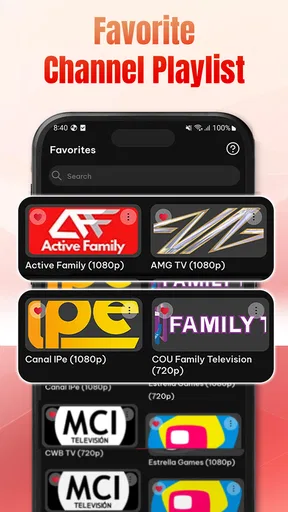
One useful approach is to prepare before you need the stream. I’d add or organize the channels I watch most, then check that they open while I have time to troubleshoot. If the playlist is long, a little organization can matter more than scrolling through every entry during a short break. It is also sensible to keep a second option in mind for important live viewing, because a single playlist entry should not be treated as guaranteed access.
The EPG can help me decide whether to watch now or come back later, but its usefulness depends on the information available for the playlist. I would use it as a guide rather than assuming every schedule is complete or perfectly current. Likewise, VOD can make a playlist feel more flexible, but the selection and availability depend on the source being used. These are practical limits of playlist-based viewing, not reasons to dismiss the app.
For a household, I would spend a few minutes checking the controls and the layout before handing over the phone. The app is rated for Everyone, but a content rating does not mean every playlist item is suitable for every viewer. Parental controls may help with access, yet parents should still review the actual source and make sure the setup matches their family’s needs.
User Experience and Performance
Let’s talk about the user experience, which is frankly quite stellar. The app's navigation is intuitive, with everything neatly categorized and easy to find. I didn’t experience any lag or buffering, and we all know how frustrating that can be during an intense scene!
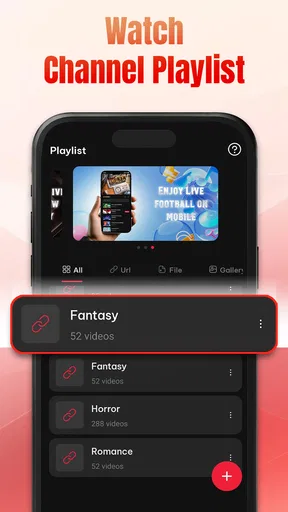
One feature I found particularly nifty was the ability to create my own playlists. I could line up a marathon of my favorite series or mix it up with some movies and sports. It’s like having a personal TV channel that only airs your favorites.
Who I’d recommend it to—and who may prefer something else
I’d point this app toward someone who already has an IPTV playlist, wants to watch it on a mobile device, and is comfortable handling a little setup. It may also suit a viewer who values having live channels and on-demand entries gathered through a chosen source rather than switching between separate apps. The free download makes it easy to consider, while the optional purchases mean I’d look carefully at any paid item before deciding whether it adds value for my particular use.
I would steer a less technical friend toward a conventional streaming service if they do not have a playlist or do not want to manage one. The same goes for anyone who needs highly predictable playback on a weak connection, wants a guaranteed programme catalogue, or expects a player to provide channels automatically. IPTV is only as convenient as the playlist and network behind it, so the flexibility comes with a bit of responsibility.
Personal Thoughts and Final Verdict
I gotta say, I was pleasantly surprised by IPTV Player: Smarters Watch TV. It’s packed with features that enhance the streaming experience without overwhelming you. The app is well-designed, runs smoothly, and offers plenty of content to keep you entertained.
Of course, nothing’s perfect. There’s a bit of a learning curve if you’re not used to IPTV apps, but once you get the hang of it, it's all good. The app could also benefit from more integrated help options for those who might need a little guidance.
Overall, if you’re hunting for a reliable streaming app that offers flexibility and a wide range of content, this app is worth checking out. You can find it on the Google Play Store and Apple App Store, ready to transform your streaming game.
It has an average rating of 4.1 from around 6,500 ratings, with 78 written reviews and over 5 million installs. That level of adoption suggests plenty of people have given it a try, though I would still judge it by whether my playlist works well on my own device and connection. It is free to start and rated for Everyone, which makes trying the player approachable, but neither point removes the need to assess the streams themselves.
So, give it a whirl and let me know your thoughts. Happy streaming!
My connectivity verdict
My bottom line is that this is a flexible player for someone who knows what playlist they want to use and has a reasonably steady connection. I would test a few channels on Wi-Fi first, learn how the guide and playlists fit my routine, and then decide whether mobile viewing is worth the data and occasional network uncertainty. If I wanted a self-contained catalogue with minimal setup, I would choose a conventional streaming app instead. For playlist-led viewing, though, this gives me a practical way to watch on the go—as long as I remember that the connection and source are part of the experience.
Verdict
Strengths of IPTV Player - Live TV Online
- Intuitive user interface for easy navigation.
- Supports a wide range of video formats.
- Customizable playlists for convenience.
- High-quality streaming with minimal buffering.
- Compatible with multiple devices.
Limitations of IPTV Player - Live TV Online
- Requires stable internet for optimal performance.
- Ads can be intrusive in free version.
- Limited support for certain file types.
- Some features locked behind premium version.
- Occasional lag on older devices.
Similar Picks in This Category
View All
Google TV
Google LLC3.9

iTunes
Apple4.7

YouTube
Google LLC3.8

MX Player
Amazon Mobile LLC4.2

CapCut - Video Editor
Bytedance Pte. Ltd.3.5

PLAYit-All in One Video Player
PLAYIT TECHNOLOGY PTE. LTD.4.5
Frequently Asked Questions
What is IPTV Player: Smarters Watch TV and how does it work?
IPTV Player: Smarters Watch TV is an application that allows users to stream live TV, movies, and series on their devices. It works by connecting to IPTV services that provide content. Users need to have their own IPTV subscription and enter their login credentials into the app to access content.
Is IPTV Player: Smarters Watch TV free to use, or is there a subscription fee?
The IPTV Player: Smarters Watch TV app itself is free to download. However, to stream content, you will need a subscription from an IPTV service, which usually involves a fee. The app functions as a media player and does not provide any content itself.
What devices are compatible with IPTV Player: Smarters Watch TV?
IPTV Player: Smarters Watch TV is compatible with a range of devices, including Android and iOS smartphones and tablets. It may also be available for smart TVs and streaming devices like Android TV and Firestick, enhancing the viewing experience on a larger screen.
How can I import my IPTV playlist into the app?
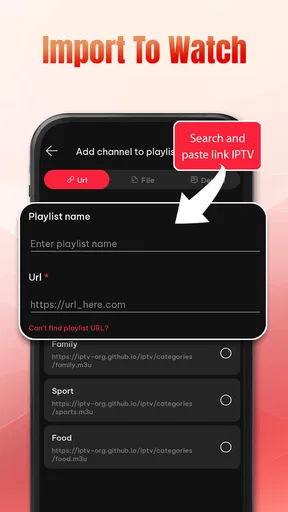
To import your IPTV playlist into the app, you need to use your IPTV service provider's login details. Enter the URL or file provided by your service into the app. This will allow you to access the channels, movies, and shows included in your subscription.
Is IPTV Player: Smarters Watch TV safe and legal to use?
The app itself is safe to download from official app stores and is legal to use as a media player. However, the legality of IPTV services can vary based on your location and the content being streamed. Ensure that you are using a legitimate service to avoid any legal issues.
